


































Screenshots
|
|

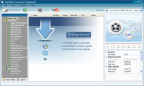
main program window
Select Output Video Profile
Any Video Converter Professional features review, video tutorial and free downloads. Convert video files to a wide range of supported output video formats in a few minutes and enjoy it!
|
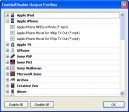
Customize Output Video Profile
Powered by Digital River
e-mail:
Contact Digital River
phone:
+1 (952) 253-1234
+1 (952) 674-4444
address:
Digital River, Inc.
c/o oneNetworkDirect
9625 W 76th Street
Eden Prairie, MN 55344
e-mail:
Contact Digital River
phone:
+1 (952) 253-1234
+1 (952) 674-4444
address:
Digital River, Inc.
c/o oneNetworkDirect
9625 W 76th Street
Eden Prairie, MN 55344

Any Video Converter Professional Review
The installation of 22.7 Mb distributive of Any Video Converter Professional version 3 went without any issues. Don’t be surprised that the file size is too small I noticed that all installation files of AnvSoftware Inc. company are the same small size, e.g. the distributive of Any DVD Converter Professional is about 30 Mb. Despite of this fact all AnvSoftware Inc. video converters are powerful and reach with supported video formats.
As a bonus Any Video Converter Professional advice you install DriverScanner 2012 by Uniblue Software. This piece of software checks the system for outdated and not used software drivers and suggests you to delete them. The main aim of this procedure is to clean the system from unnecessary garbage and speed up overall performance. I suggest you to install DriverScanner 2012, by the way its absolutely free.

When I looked at the main window of the video converter I thought that I have already seen this before and I was right. The interface of Any Video Converter Professional is similar to Any DVD Converter Professional except of some options omitted in the first one. If we compare Video Converter Professional and DVD Converter Professional you will see that the first software is identical copy of the second one except the ability to add files from DVD discs and less output video formats supported.
Which video formats Any Video Converter Professional supports?
Though the software support less video formats in comparison with its older brother - DVD Converter it still worth attention.
Input video formats:
3g2, 3gp, 3gpp, 3gp2, amv, asf, avi, avs, dat, divx, dv, dvr-ms, f4v, flv, m1v, m2p, m2t, m2ts, m2v, m4v, mkv, mod, mov, mp4, mpe, mpeg, mpeg2, mpeg4, mpg, mpv, mts, nsv, ogg, ogm, ogv, qt, rm, rmvb, tod, trp, tp, ts, vob, vro, wmv, webm
Output video formats:
wmv, mpg, mp4, avi, asf, m2ts, 3gp, 3g2, flv, mkv, swf, webm
Any Video Converter Pro was ranked #3 out of 20 best video converters by toptenreviews. The selection criteria were the following: supported input and output formats, additional features, ease of use and support. Regarding video formats I completely agree, there are lots of them to choose from. The software is very easy in use and I would say intuitive to understand, though there are lots of guides and tutorials it doesn’t require them at all to start using this video converter. Additional features include the same set of tools as in Any DVD Converter Pro - ability to crop video files, change brightness, contrast, saturation and use some video effects, like mirror, rotate, etc.
System requirements
OS: 2000 SP4, XP, Vista (32bit & 64bit), Windows 7 (32bit & 64bit)
Processor: 1GHz Intel/AMD processor or above
RAM: 256MB RAM (512MB or above recommended)
Free Hard Disk: 70MB for installation
Conclusion
Easy and fast video converter from AnvSoftware Inc. surely deserves your attention in case you intend to convert some video. Any Video Converter Pro 3 doesn’t slow down your system during the conversion process, when I tested it on my system the VideoConverter.exe process showed about 10 Mb of memory usage so you can run additional applications simultaneously.
See also
Any Video Converter Ultimate review and coupon code
Which video formats Any Video Converter Professional supports?
Though the software support less video formats in comparison with its older brother - DVD Converter it still worth attention.
Input video formats:
3g2, 3gp, 3gpp, 3gp2, amv, asf, avi, avs, dat, divx, dv, dvr-ms, f4v, flv, m1v, m2p, m2t, m2ts, m2v, m4v, mkv, mod, mov, mp4, mpe, mpeg, mpeg2, mpeg4, mpg, mpv, mts, nsv, ogg, ogm, ogv, qt, rm, rmvb, tod, trp, tp, ts, vob, vro, wmv, webm
Output video formats:
wmv, mpg, mp4, avi, asf, m2ts, 3gp, 3g2, flv, mkv, swf, webm
Any Video Converter Pro was ranked #3 out of 20 best video converters by toptenreviews. The selection criteria were the following: supported input and output formats, additional features, ease of use and support. Regarding video formats I completely agree, there are lots of them to choose from. The software is very easy in use and I would say intuitive to understand, though there are lots of guides and tutorials it doesn’t require them at all to start using this video converter. Additional features include the same set of tools as in Any DVD Converter Pro - ability to crop video files, change brightness, contrast, saturation and use some video effects, like mirror, rotate, etc.
System requirements
OS: 2000 SP4, XP, Vista (32bit & 64bit), Windows 7 (32bit & 64bit)
Processor: 1GHz Intel/AMD processor or above
RAM: 256MB RAM (512MB or above recommended)
Free Hard Disk: 70MB for installation
Conclusion
Easy and fast video converter from AnvSoftware Inc. surely deserves your attention in case you intend to convert some video. Any Video Converter Pro 3 doesn’t slow down your system during the conversion process, when I tested it on my system the VideoConverter.exe process showed about 10 Mb of memory usage so you can run additional applications simultaneously.
See also
Any Video Converter Ultimate review and coupon code
Like this review? Share it with your friends!
Other video converters
AVS4YOU Unlimited Subscription
AVS Video Converter
VSO Convert X to DVD
Any Video Converter Ultimate
DVDFab All-in-One Lifetime
SoundTaxi Media Suite
Cyberlink PowerDVD 23
Cyberlink PowerDirector 365
AVS4YOU Unlimited Subscription
AVS Video Converter
VSO Convert X to DVD
Any Video Converter Ultimate
DVDFab All-in-One Lifetime
SoundTaxi Media Suite
Cyberlink PowerDVD 23
Cyberlink PowerDirector 365
70% Off Any Video Converter Professional Coupon, Discount Codes and Deals
70% Off Any Video Converter Ultimate for Win (lifetime License) Use Coupon
70% Off Any Video Converter Ultimate for MAC (lifetime License) Use Coupon
70% Off AVC Pro for Win (lifetime License) Use Coupon
50% Off AVC Pro for MAC (lifetime License) Use Coupon
50% Off AVC Pro for Win 12 Month (1 year subscription) Use Coupon
50% Off AVC Pro for MAC 12 Month (1 year subscription) Use Coupon



.......... $14,96




