

































Acronis True Image Home 2012 Review, examples of plus pack add-on usage and online backup.



Screenshots
|

Awards


TopTenREVIEWS Recommended Acronis True Image Home
"Acronis True Image is versatile and powerful, yet fairly easy to use. The program includes wizards that walk you through each task, and you can connect to help files and customer support with just one click on the control panel".
"Acronis True Image is versatile and powerful, yet fairly easy to use. The program includes wizards that walk you through each task, and you can connect to help files and customer support with just one click on the control panel".
New user friendly GUI
|
Complete Windows 7 integration
|

New time explorer for backup management
|

Backup and restore without reinstalling any software

e-mail:
cs@cleverbridge.com
phone:
+1-866-522-6855
(Intl.: +1-312-922-8693)
fax:
+1-312-376-1854
address:
cleverbridge
360 N. Michigan Ave.
Suite 1900
Chicago, IL, 60601-3805, USA
cs@cleverbridge.com
phone:
+1-866-522-6855
(Intl.: +1-312-922-8693)
fax:
+1-312-376-1854
address:
cleverbridge
360 N. Michigan Ave.
Suite 1900
Chicago, IL, 60601-3805, USA




..........$44,99
Upgrade ..............$23,99


Acronis True Image Home 2012 new features review
Before actual review I would like to say a few words about installing and updating the software. The installation of trial version of Acronis True Image Home 2012 went smoothly, I was so excited with new software features that I decided to activate it to the full version. Starting from this moment I faced several issues and would like to share solution to those who may experience the same troubles.
I entered the serial number to activate the software
Before actual review I would like to say a few words about installing and updating the software. The installation of trial version of Acronis True Image Home 2012 went smoothly, I was so excited with new software features that I decided to activate it to the full version. Starting from this moment I faced several issues and would like to share solution to those who may experience the same troubles.
I entered the serial number to activate the software
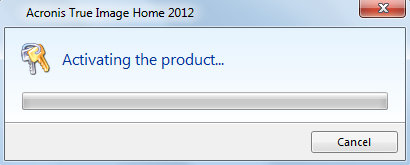
Several seconds later I saw the following error messages: "Failed to connect to the Acronis activation server".
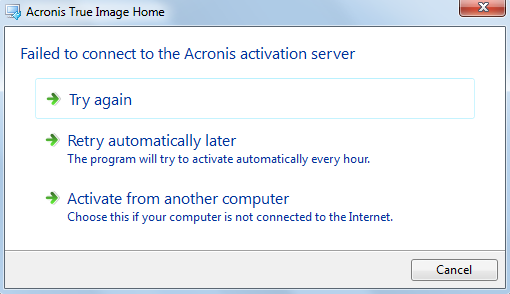
I chose try again and then saw this error message: "Incorrect checksum of the downloaded package".
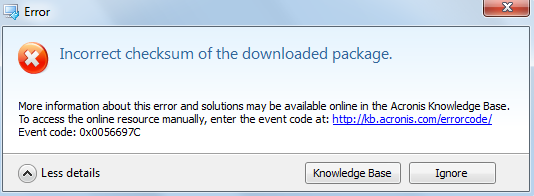
It seemed rather strange because the trial version worked perfectly. The solution was found quickly, all you have to do is just download the installation file again, uninstall the trial version and install a fresh version. You may download an installation file with the latest build of Acronis True Image Home 2012 from your account, but first you should register the serial number using the following link.
Once the program is registered under your account you may download the latest build, download bootable media in .iso format, download BartPE plugin and buy Pay Per Incident support.
I entered the serial number for the full version and the installation was successful. Note that backup archives and images created within the trial version are fully functional, so there is no need to recreate them. If you created Acronis bootable disc using the trial version you must recreate it with the full version, because the only available option under bootable media is "Restore". I would also recommend to recreate Acronis bootable disc every time you install the latest build of the program. See guide how to create Acronis bootable disc and use it to recover the system.
Once the program is registered under your account you may download the latest build, download bootable media in .iso format, download BartPE plugin and buy Pay Per Incident support.
I entered the serial number for the full version and the installation was successful. Note that backup archives and images created within the trial version are fully functional, so there is no need to recreate them. If you created Acronis bootable disc using the trial version you must recreate it with the full version, because the only available option under bootable media is "Restore". I would also recommend to recreate Acronis bootable disc every time you install the latest build of the program. See guide how to create Acronis bootable disc and use it to recover the system.
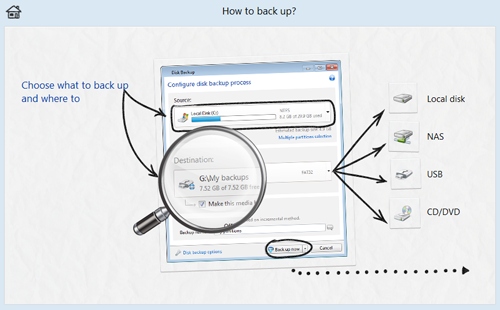
New features in Acronis True Image Home 2012
- Synchronization. For many years users save files on the flash media or send a fresh version of the document to e-mail, despite the fact that it is inefficient and violates the order of the documents. The new product on the market for the first time Acronis True Image Home 2012 integrates with data synchronization. This allows the program not only protect your computer from crashes, but also provide the user with access to current versions of your files from anywhere, anytime.
The synchronized files can be located anywhere: on your PC, USB-drives or network drives, NAS. If changes are made to one copy of the synchronized files the program will automatically update the another copy to the latest version so that regardless of the location data the user will always work with the latest version of the file. Synchronization is done on a peer to peer network, and does not require connection to the server.
To synchronize files it is enough to specify a folder on the computer where the data will be kept synchronized. After selecting the folder for storing the information on all the computers will be updated and changes will be tracked automatically. Home users can also synchronize files with friends and family who have installed Acronis True Image Home 2012. Synchronization is performed with equal ease in the home network and the Internet.
See step-by-step examples with Acronis True Image Home 2012 Synchronization
- Enhanced NAS support. Now you do not have to went through network shares to find NAS device, Acronis True Image Home automatically detects all NAS devices and list them.
- Acronis Extended Capacity Manager, more than 2 TB hard drives support. It is well known that some old operating systems does not support drives larger than 2 GB, now it is not a problem. Acronis True Image properly detects drives that are larger than 2 GB and you can use them for backup and recovery purposes.
- Full integration of Acronis Online Backup into Acronis True Image Home 2012. When you create online backup it is shown in backup tasks of the program among others.
- Improved log. Calendar view makes it much easier to track the program activity.
- Full support with GPT and EFI disks.
Acronis True Image Home 2012 Plus Pack
Plus Pack add-on is specially designed to help users restore the system to a different hardware in case of disaster. Acronis Universal Restore module which was originally used only in Acronis Corporate products allows to change Windows Hardware Abstraction Layer (HAL.dll) and install device drivers for proper booting.
- Synchronization. For many years users save files on the flash media or send a fresh version of the document to e-mail, despite the fact that it is inefficient and violates the order of the documents. The new product on the market for the first time Acronis True Image Home 2012 integrates with data synchronization. This allows the program not only protect your computer from crashes, but also provide the user with access to current versions of your files from anywhere, anytime.
The synchronized files can be located anywhere: on your PC, USB-drives or network drives, NAS. If changes are made to one copy of the synchronized files the program will automatically update the another copy to the latest version so that regardless of the location data the user will always work with the latest version of the file. Synchronization is done on a peer to peer network, and does not require connection to the server.
To synchronize files it is enough to specify a folder on the computer where the data will be kept synchronized. After selecting the folder for storing the information on all the computers will be updated and changes will be tracked automatically. Home users can also synchronize files with friends and family who have installed Acronis True Image Home 2012. Synchronization is performed with equal ease in the home network and the Internet.
See step-by-step examples with Acronis True Image Home 2012 Synchronization
- Enhanced NAS support. Now you do not have to went through network shares to find NAS device, Acronis True Image Home automatically detects all NAS devices and list them.
- Acronis Extended Capacity Manager, more than 2 TB hard drives support. It is well known that some old operating systems does not support drives larger than 2 GB, now it is not a problem. Acronis True Image properly detects drives that are larger than 2 GB and you can use them for backup and recovery purposes.
- Full integration of Acronis Online Backup into Acronis True Image Home 2012. When you create online backup it is shown in backup tasks of the program among others.
- Improved log. Calendar view makes it much easier to track the program activity.
- Full support with GPT and EFI disks.
Acronis True Image Home 2012 Plus Pack
Plus Pack add-on is specially designed to help users restore the system to a different hardware in case of disaster. Acronis Universal Restore module which was originally used only in Acronis Corporate products allows to change Windows Hardware Abstraction Layer (HAL.dll) and install device drivers for proper booting.
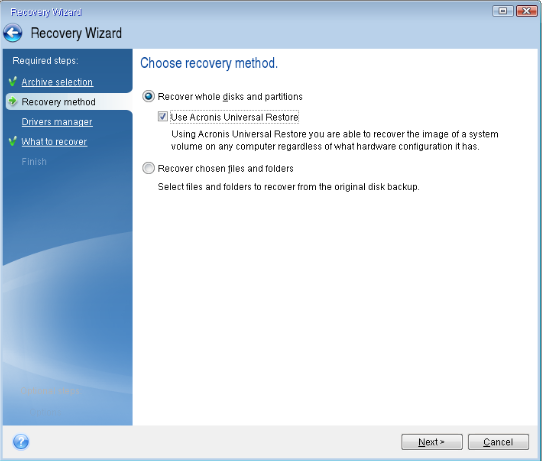
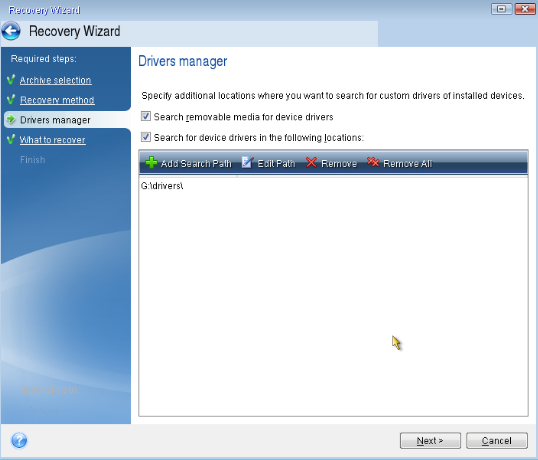
To start using plus pack add-on you should first install Acronis True Image Home 2012 then Acronis True Image Home 2012 Plus Pack add-on and create Acronis bootable disc. Note that the build number of the software and add-on should be the same. The main idea of using plus pack is that you specify the location for necessary boot device drivers so that the image of the system can boot on a new hardware. See Acronis True Image Home 2012 Plus Pack Review
Acronis Online Backup
Acronis Online Backup is a remote storage for your backup archives and images.
How to start using Online Backup?
- From the main program window choose Backup and Recovery -> Online Backup
- Enter e-mail address you used to create Acronis account
- Enter the password for your account
From Acronis backup online window you can check free space in online storage, buy subscription for a month or a year, schedule the backup creation and use backup options (e.g. you may set the certain amount of backups in online storage or delete backups that are older than x months/weeks/days).
Acronis Online Backup is a remote storage for your backup archives and images.
How to start using Online Backup?
- From the main program window choose Backup and Recovery -> Online Backup
- Enter e-mail address you used to create Acronis account
- Enter the password for your account
From Acronis backup online window you can check free space in online storage, buy subscription for a month or a year, schedule the backup creation and use backup options (e.g. you may set the certain amount of backups in online storage or delete backups that are older than x months/weeks/days).
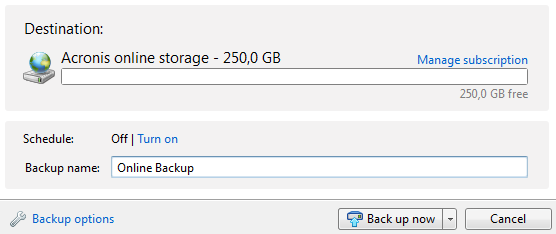
Note that you can use 30-days free online backup once you purchase Acronis True Image Home 2012.
Step-by-step video tutorial - How to recover with Acronis True Image Home 2012

Like this review? Share it with your friends!

Acronis True Image 2014 coupon codes, upgrade discounts and special offers
Best Offer! 40% Off Acronis True Image 2014 Premium Use Coupon
Best Bundle! 77% Off Acronis True Image 2014 Premium + 7 more products FREE Use Discount
HOT! 60% Off Acronis True Image 2014 Premium Family Pack (3 copies) Use Offer
HOT! 47% Off Acronis True Image 2014 Family Pack (3 copies) Use Discount
NEW! 47% Off Acronis Disk Director 12 Family Pack (3 copies) Use Coupon
NEW! 35% Off Acronis True Image 2014 + Acronis Disk Director 12 Use Promo
30% Off Acronis True Image 2014 Premium + 250 GB Cloud Storage Use Coupon
Best Offer! 40% Off Acronis True Image 2014 Premium Use Coupon
Best Bundle! 77% Off Acronis True Image 2014 Premium + 7 more products FREE Use Discount
HOT! 60% Off Acronis True Image 2014 Premium Family Pack (3 copies) Use Offer
HOT! 47% Off Acronis True Image 2014 Family Pack (3 copies) Use Discount
NEW! 47% Off Acronis Disk Director 12 Family Pack (3 copies) Use Coupon
NEW! 35% Off Acronis True Image 2014 + Acronis Disk Director 12 Use Promo
30% Off Acronis True Image 2014 Premium + 250 GB Cloud Storage Use Coupon


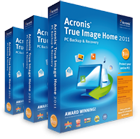
Acronis True Image 2014 Premium Family Pack 3 PCs Discount
Price: $239.97
Only $99.99

Price: $149.97
Acronis True Image 2014 Family Pack 3 PCs Discount
Only $79.99