






























BitDefender Total Security 2024 Coupon 50% Off back to school offer. Antivirus software review, free trials, user guides and video tutorials.


............$19.99



User Guide (1.9 mb)
Powered by Digital River
e-mail:
Contact Digital River
phone:
+1 (952) 253-1234
+1 (952) 674-4444
address:
Digital River, Inc.
c/o oneNetworkDirect
9625 W 76th Street
Eden Prairie, MN 55344
e-mail:
Contact Digital River
phone:
+1 (952) 253-1234
+1 (952) 674-4444
address:
Digital River, Inc.
c/o oneNetworkDirect
9625 W 76th Street
Eden Prairie, MN 55344
BitDefender Total Security 2024 Review
I would like to start BitDefender Total Security 2024 review from the very beginning, from downloading the installation file. First of all you should download the file from Bitdefender website about 628 Kb and run it. I was little confused as the download file had bitdefender_antivirus.exe ending and I was going to install Total Security 2024 version. It seems that there is only one installation file for all three versions: antivirus, internet security and total security. The trial version is a full package and depends on the serial number you use during the activation.
Starting from the installation you may face not very pleasant surprises if you run any other antivirus and antispyware software. I faced issues myself as I run Webroot Antispyware so I was asked to uninstall it first. Actually I was asked to uninstall Webroot security center first then (after PC reboot) the program itself, then another reboot so a little advice here would be to uninstall any antivirus or antispyware software before downloading BitDefender Total Security 2024 installation file using Windows program uninstall option. I would like to add that I had the same antivirus issues using another computer, I had McAfee antivirus installed on it and had to complete all steps described above first. I suppose the issue is in the incompatibility of antivirus software drivers on hardware level.
When you complete downloading and start installing BitDefender Total Security 2024 you will have two options, first to register your license online using the serial number and the e-mail address and the second to evaluate the product for 30 days. The registration allows you to receive special deals, discount coupon codes and promo offers on future BitDefender antivirus products and to get free technical support.
So I typed the serial number and the e-mail address then clicked Register, after few seconds the installation began. It was nice to see that the software scans your system for viruses before the installation process.
On the final steps you will have to close FireFox, Thunderbird or Opera in order to install BitDefender Root Certificate. Click OK to automatically close them and install the certificate. When installation was finished the software notified me that during installation BitDefender scanned memory and critical system areas and no viruses have been detected. So everything went smooth on that stage as my computer didn't have an active antivirus software during the installation and the software required an Internet connect for downloading application files.
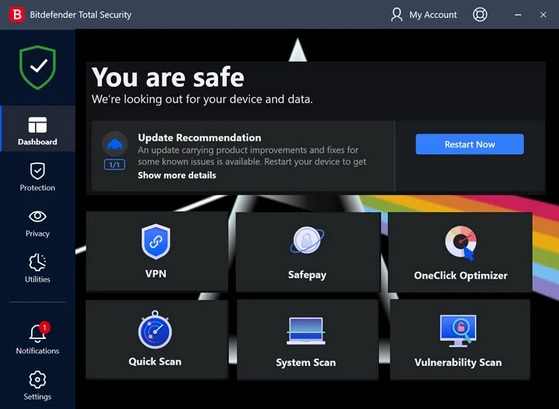
BitDefender made significant changes to the user interface in comparison with the previous version 2023 so it looks much pretty now. All main options of the program can be adjusted from the front panel.
BitDefender made significant changes to the user interface in comparison with the previous version 2023 so it looks much pretty now. All main options of the program can be adjusted from the front panel.
What's new in BitDefender Total Security 2024?
- Autopilot
With Autopilot ON the optimal security configuration will be taken without an input from your side. That means - no pop-ups and alerts, there is no need to configure anything. Autopilot example: if you try to download the file which is considered to be infected with a virus BitDefender will just place this file to quarantine (settings -> antivirus -> quarantine). In case you try to download the same file with Autopilot OFF then you will see pop-up alert that the file is infected and in case you continue to save the file the program will place it to quarantine anyway. With Autopilot ON the optimal security configuration will be taken without an input from your side.
- Scan Dispatcher
Scan Dispatcher or Auto Scan works automatically when your system is idle or close to it. It means that the software performs repetitive inspections of the entire system when it's not busy with other processes and as a result BitDefender has no effect on system performance. You can adjust this option from Antivirus tab.
- Rescue Mode
Very useful feature in case virus or malware can't be deleted using Windows by any reasons. Rescue Mode can be found in main program window -> Antivirus tab -> Rescue Mode. When you press this button Windows rebooting and Linux environment of the program is loaded where you can take actions to delete malware. This feature is the analogue for BitDefender rescue CD/DVD.
- Safebox
This is a kind of online backup with folders synchronization which resides on BitDefender servers. In order to use this features you should first create an account on BitDefender website and register the product using the serial number and e-mail address. The limit of Safebox is 2 Gb. Safebox example: create some test folder on your PC then turn on Safebox AutoSync -> click Manage -> Manage folders -> select created test folder and mark checkbox "Automatically select remote folder". Now when you modify any files from the synchronized folder they are automatically changed on the online storage.
- Virtualized Browser
The global exchange of data in real time between BitDefender servers and BitDefender 2024 products ensures rapid identification of emerging internet threats such as epidemics and large flows of spam.
The full list of the main features of BitDefender Total Security 2024
- Active Virus Control
- Rescue mode
- Virtualized Browser
- Vulnerability Scanner
- Antispam
- Two-way Firewall
- Parental Control
- Autopilot
- Search Advisor
- Scan Dispatcher
- Tune-Up
- Personal Data Filter
- Antiphising
- Chat Encryption
- File Encryption
- Safebox
Here are some useful links for BitDefender Total Security 2024:
Free trial version
Step-by-step BitDefender video tutorials
BitDefender 2024 UK Coupon Codes and Special Offers
Bitdefender UK Bundle. Buy Total Security 2024 3PCs 1YR and get Free Tastecard worth $115! Use Promo
Coupon Code: no code needed
NEW! 3% Off BitDefender Antivirus Plus 2024 (1 year 3 Pcs) Use Coupon
Coupon Code: no code needed
NEW! 35% Off BitDefender Internet Security 2024 (1 year 3 Pcs) Use Coupon
Coupon Code: no code needed
NEW! 47% Off BitDefender Total Security 2024 (1 year 3 Pcs) Use Coupon
Coupon Code: no code needed
Bitdefender UK Bundle. Buy Total Security 2024 3PCs 1YR and get Free Tastecard worth $115! Use Promo
Coupon Code: no code needed
NEW! 3% Off BitDefender Antivirus Plus 2024 (1 year 3 Pcs) Use Coupon
Coupon Code: no code needed
NEW! 35% Off BitDefender Internet Security 2024 (1 year 3 Pcs) Use Coupon
Coupon Code: no code needed
NEW! 47% Off BitDefender Total Security 2024 (1 year 3 Pcs) Use Coupon
Coupon Code: no code needed
Like this review? Share it with your friends!
BitDefender Total Security 2024 Coupon
(5 Devices / 1 Year)
(5 Devices / 1 Year)
Haven't found a coupon code you were looking for? Try these bitdefender coupons
80% Off BitDefender Total Security 2024 Coupon Codes and Discounts
NEW! 80% Off Bitdefender Total Security 2024 (5 Devices / 1 Yr) Use Discount Code
HOT! 75% Off BitDefender Family Pack 2024 (Unlimited Devices / 1 Yr) Use Coupon
HOT! Bitdefender Deals and Promo Offers Use Deals
50% Off BitDefender GravityZone Small Business Security Use Promo
50% Off Bitdefender GravityZone Business Security (1 Year / 10 Devices) Use Coupon
50% Off Bitdefender GravityZone Advanced Business Security (1 Year / 5 Devices) Use Coupon
70% Off BitDefender Ultimate Security 2024 (10 Devices / 1 Year) Use Coupon
50% Off BitDefender Premium Security 2024 (10 Devices / 1 Year) Use Coupon
50% Off BitDefender Internet Security 2024 (3 Devices / 1 Year) Use Coupon
63% Off BitDefender Antivirus 2024 (3 Devices / 1 Year) Use Coupon
60% Off BitDefender 2024 Upgrade/Renew Use Discount
50% Off BitDefender Small Office Security (10 Devices / 1 Year) Use Coupon
40% Off BitDefender Antivirus for MAC (3 Devices / 1 Year) Use Coupon
60% Off BitDefender Premium VPN Use Coupon
60% Off BitDefender Password Manager Use Coupon
70% Off BitDefender Identity Theft Protection Premium Use Promo Code
70% Off BitDefender Identity Theft Protection Standard Use Promo Code
70% Off BitDefender Digital Identity Protection Use Promo Code






Other Antivirus software:
AVG Antivirus 2024
AVG Internet Security 2024
McAfee Antivirus 2024
McAfee Internet Security 2024
McAfee Total Protection 2024
Avast Internet Security
Avast Pro Antivirus
Bitdefender Internet Security 2024
Bitdefender Antivirus 2024
Kaspersky Total Security 2024
Kaspersky Plus Internet Security 2024
Kaspersky Standard Antivirus 2024
AVG Antivirus 2024
AVG Internet Security 2024
McAfee Antivirus 2024
McAfee Internet Security 2024
McAfee Total Protection 2024
Avast Internet Security
Avast Pro Antivirus
Bitdefender Internet Security 2024
Bitdefender Antivirus 2024
Kaspersky Total Security 2024
Kaspersky Plus Internet Security 2024
Kaspersky Standard Antivirus 2024